What Triggers the AdBlue Countdown and How to Stop It Safely
An AdBlue countdown warning is time-critical. Ignore it or guess the fix and the vehicle can refuse to start. This guide explains what triggers the countdown, what makes it worse, and how it is cleared properly.
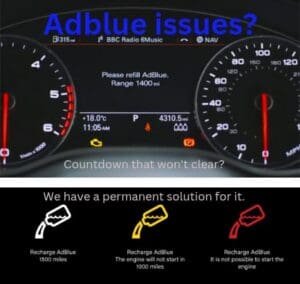
The AdBlue countdown is one of the most stressful dashboard messages drivers see. It usually reads something like “Starting prevented in 700 miles” and counts down every time you drive.
Once the countdown reaches zero, the vehicle can refuse to start. Adding AdBlue at that point does not help. The system needs to see the fault resolved before it will allow the engine to run.
Common countdown messages include
- • “Starting prevented in 700 miles”
- • “No engine restart in 500 miles”
- • “Emissions fault – see handbook”
- • “SCR system fault”
The wording varies by manufacturer, but the risk is the same.
What actually triggers an AdBlue countdown
The countdown does not start just because AdBlue is low. It begins when the vehicle decides emissions targets are not being met or cannot be confirmed.
- AdBlue quality faults where the system believes the fluid is contaminated or incorrect.
- NOx sensor readings that suggest emissions are not reducing as expected.
- Dosing faults where AdBlue is not being injected correctly.
- Tank or pump faults that prevent accurate level or pressure control.
- Electrical or wiring issues causing unreliable sensor data.
The system is designed to protect emissions compliance, not convenience.
Why topping up AdBlue often does nothing
Many drivers add AdBlue as soon as the countdown appears, but the warning stays. That is because the system is not complaining about quantity. It is complaining about trust.
Common reasons the countdown remains after a fill
- The level sensor is misreading.
- The system still sees a quality or dosing fault.
- Crystallisation is blocking flow.
- A related SCR fault is still active.
Repeated top-ups can make things worse if the tank is already full.
What not to do when a countdown starts
These actions often turn a manageable fault into a bigger problem.
- Do not keep clearing codes without fixing the fault.
- Do not keep adding AdBlue “just in case”.
- Do not ignore the countdown until it hits zero.
- Do not assume a new tank or pump is always required.
How the countdown is cleared properly
Clearing the countdown safely means proving the fault is gone, not just deleting the warning.
- Confirm fault codes and freeze-frame data.
- Check live readings from the SCR system.
- Inspect physical components for leaks or blockages.
- Fix the confirmed fault.
- Reset and validate with post-repair checks.
This is why some vehicles clear immediately, while others require driving cycles before the system re-trusts itself.
Do not wait for the countdown to hit zero
If you are in a countdown, time matters. The sooner the fault is confirmed, the easier it is to resolve.
Mobile service across the West Midlands and surrounding areas.
AdBlue countdown FAQs
Can I keep driving with an AdBlue countdown?
You can drive until the countdown reaches zero, but once it does the vehicle may not restart. Leaving it late increases risk.
Will adding AdBlue clear the countdown?
Only if the issue was genuinely low level. Most countdowns are caused by faults, not empty tanks.
Can the countdown be reset without fixing the fault?
It can be reset temporarily, but it will return if the system still detects a problem. A lasting reset requires a confirmed fix.